BuildCalc
- 4.7
- Rating
- 10.00K
- Installs
- $24.99
- Price

 Analysis by App-foxy
Construction calculations are easy to underestimate. On a quiet desk, a pencil and a basic calculator may be enough; on a job site, the same calculation can involve mixed units, fractions, dimensions, material quantities, and a result that needs to be checked quickly. I spent time looking at BuildCalc from that practical angle, focusing not only on what it calculates but also on how comfortably different people can use it in different working conditions.
This is a paid business app from 42nd Parallel, priced at $24.99, and it is aimed at people who regularly work with construction measurements rather than anyone looking for a general-purpose calculator. Its store summary presents it as both easy and advanced, which is an ambitious combination. In my experience, the appeal is strongest when you want construction-oriented calculations close at hand without carrying a separate specialist calculator.
The app is available for Everyone and supports devices using OS 8.0 or later. It has been around since Jul 27, 2011, and the current version is 2.15.126. That long presence matters to me because a tool used for estimating, cutting, ordering, or checking work benefits from being established rather than feeling like a disposable novelty. Its average rating is 4.7 from over 200 ratings, with more than 70 written reviews, and it has passed 10K+ installs.
You May Also Like

 AccuWeather: Weather Radar
AccuWeather Review: A Quick, Clear Forecast for Everyday Decisions
For everyday plans, the best forecast is the one you can understand quickly. AccuWeather makes rain timing, radar, and local conditions easy to act on, with a few trade-offs.

 Hill Climb Racing
Why Hill Climb Racing Still Turns Crashes Into One More Run
A tiny car, a bumpy hill and one more upgrade: Hill Climb Racing keeps resurfacing because its simple chaos makes every near-miss feel personal.

 AliExpress - Shopping App
AliExpress Makes Global Shopping Feel Personal, but Shoppers Bear the Risk
AliExpress turns a global marketplace into a pocket-sized discovery engine. Its reach is useful, its shopping loop compelling, and its trade-offs easy to miss.

 Lords Mobile: Kingdom Wars
Lords Mobile Is a Kingdom-Building Routine, Not a Quick Match
A case-by-case verdict on the building, battles, device demands, and social commitments that make Lords Mobile rewarding for some players and exhausting for others.

 PDF Scanner app - TapScanner
TapScanner Makes Paperwork Easier to Capture, Check, and Share
TapScanner makes scanning with a phone feel less like a rescue operation and more like a dependable step in getting work done. Its capture tools are useful, though not flawless.

 Block Blast!
Block Blast! Shows How Much a Puzzle Game Can Leave Out
A quiet grid game shows why puzzle players increasingly value instant clarity, repeatable skill and low-pressure play—and where the genre still needs to catch up.
More From Our News Desk
View All News


How the interface supports real construction work
I look at BuildCalc’s interface as a working surface: the goal is to keep a measurement’s meaning clear while moving from what you recorded to the calculation you need. I’ll also consider how a short, repeatable checking routine can make that workflow more dependable, especially when the phone is being used between other tasks.
Readability and navigation come before advanced functions
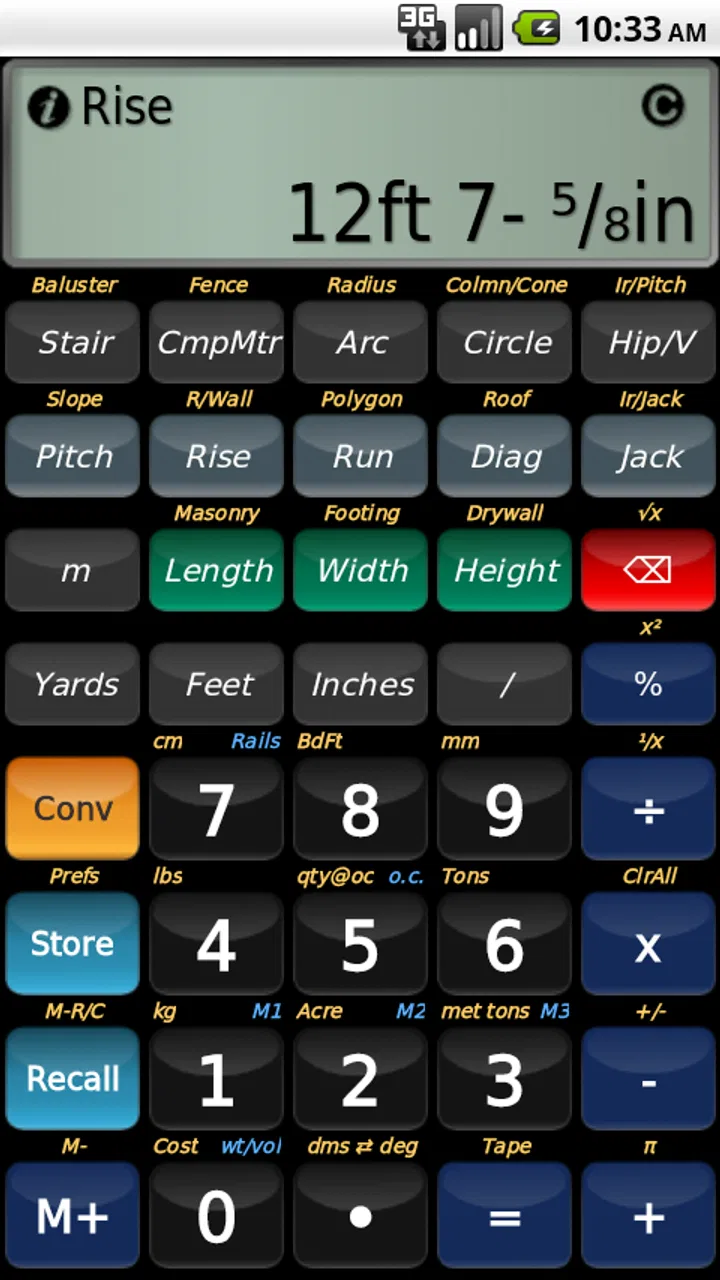
The first thing I look for in a construction calculator is whether I can understand the screen while thinking about the job, not the software. BuildCalc is most useful when its construction-focused layout reduces the mental translation between a measurement and the number I need. A conventional calculator can handle arithmetic, but it leaves me to remember how to convert feet, inches, fractions, areas, or quantities. A specialist tool earns its place by making those steps feel closer to the way builders actually speak and work.
That also creates a trade-off. A construction calculator has more concepts than a four-function calculator, so the interface can feel dense to someone who only needs occasional addition and multiplication. I would not recommend buying it simply because construction work is mentioned in the description. The $24.99 cost makes more sense for a contractor, estimator, carpenter, remodeler, or serious DIY user who expects to return to the same kinds of calculations repeatedly.
For readability, I would use the app in a deliberate sequence: enter the dimensions, pause to check the displayed values, then confirm the result before using it in a cut list or estimate. That habit is especially valuable for anyone who finds small interface elements, changing fields, or dense screens tiring. Even a well-designed calculator cannot remove the need to distinguish an input from an output. A quick visual check is part of safe use.
I also see a benefit for users who think spatially rather than algebraically. Entering a construction measurement in a familiar form can be less intimidating than building a long formula from scratch. Someone who is comfortable with a tape measure but less comfortable with abstract arithmetic may find a specialist calculator easier to approach than a standard calculator app. The important point is to learn the app in a calm setting before depending on it beside active work.
Why a specialist workflow can be easier than a general calculator
The usual alternative is a phone’s built-in calculator, perhaps combined with a notes app or a web search for unit conversions. That approach costs less, but it makes the user responsible for remembering conversion rules and keeping intermediate values organized. It is also easy to lose the context of a number: is it a length, an area, a count, or a waste allowance?
BuildCalc’s value is therefore less about replacing arithmetic and more about keeping construction arithmetic in one working environment. That distinction is important. If I only need to divide a bill or calculate a discount, a normal calculator is quicker. If I am moving between dimensions and quantities during a project, a construction-specific tool is more coherent and less dependent on a collection of improvised workarounds.
A useful personal workflow would be to prepare a small set of recurring calculations before arriving at the job site. For example, I would decide in advance whether I am checking material coverage, comparing dimensions, or turning a measured space into an estimated quantity. That reduces the chance of opening the app under pressure without knowing which path to take. The app can support the calculation, but it does not replace a clear measurement plan.
Motor and sensory considerations in the field
Construction environments are not ideal phone environments. Gloves, dust, vibration, glare, noise, and limited attention all change how a person interacts with a screen. This is where I would be cautious about assuming that a calculator designed for construction automatically works equally well for every user. A person with limited fine-motor control may need more time to tap accurately, while someone with low vision may struggle if the display is hard to distinguish in bright light.
I would treat the app as a tool for checking and planning, not as something to operate casually while climbing, carrying materials, or standing in an unsafe position. The safest routine is to stop, stabilize the phone, enter the values, and verify the result. That advice is not a criticism of BuildCalc specifically; it reflects the reality that numerical errors become more likely when the user is distracted or physically uncomfortable.
Users with tremors or reduced dexterity may prefer to enter calculations in a quiet area and use the result later rather than trying to work one-handed. People who rely on larger text or stronger contrast should test the app on their own device before paying, because the practical experience depends on the screen and operating-system settings as well as the application. I would also avoid judging readability from a short store preview. A real test with the phone, lighting, and viewing distance you normally use is much more informative.
For users with hearing differences, the calculation itself is not dependent on spoken instructions or audio feedback in the way some other tools are. That can make a visual workflow more suitable in a noisy workshop. At the same time, visual dependence can be a barrier for someone who cannot comfortably read a dense numerical interface. The inclusive question is not whether the app is universally accessible; it is whether its visual method matches the user’s abilities and working conditions.
Situational access: desk, workshop, vehicle, and home project
BuildCalc makes the most sense when I imagine using it at a workbench or during an estimate, where I have enough attention to enter measurements carefully. A contractor could use it while discussing a room with a customer, checking a rough quantity before preparing a quote. A carpenter might use it after taking measurements, when a construction-oriented calculation is more useful than a basic calculator. A homeowner could use it for a renovation, but only if the price and specialist focus are justified by repeated use.
One realistic scenario is a flooring estimate. I measure the room, enter the relevant dimensions, and use the app to work through the required calculation rather than switching between a tape measure, a notes page, and a general calculator. I would still write the original measurements down separately. If one value is entered incorrectly, a neat result can look convincing, so keeping the source measurements provides an independent check.
Another scenario is a quick comparison between two possible dimensions during a remodel. Instead of asking a customer to wait while I search for a conversion explanation, I can work through the numbers in a tool designed for construction use. The advantage is not just speed; it is keeping the conversation focused on the physical space rather than on calculator mechanics.
For remote or low-connectivity work, a dedicated installed app can be more convenient than relying on a browser-based calculator, because the calculation tool is already on the phone. I would not turn that into a promise about every offline behavior or every device, but the installed-app format is well suited to places where opening a web page is inconvenient. Before a major job, I would install and test it in the exact environment where I expect to use it.
Situational access also includes language and confidence. A person who knows construction terminology may move through a specialist interface naturally, while a beginner may need a learning period. I would start with simple, familiar examples and compare each answer against a hand calculation. That approach helps reveal whether the app’s input style suits the user before it becomes part of a real estimate.
Three practical habits that make the app safer to use
My first recommended habit is to separate measuring from calculating. Do not measure one wall, enter it immediately, then rush to the next task without recording the value. Write down the raw dimensions first, including units and any unusual shape. Then use BuildCalc to process them. This makes errors easier to trace and helps when a customer or colleague asks how the result was reached.
Second, keep a consistent unit convention within each calculation. Mixed-unit work is one of the reasons a construction calculator is useful, but it is also where casual mistakes can happen. Before pressing the final operation, I would look at every dimension and ask whether it represents the same kind of measurement I intended. A result that is mathematically correct can still be practically wrong if the inputs describe different things.
Third, use independent checks for decisions that affect purchases or cuts. I would repeat an important calculation manually, with a second tool, or by estimating the result mentally. The point is not to distrust the app; it is to catch a misplaced digit, an incorrect dimension, or a misunderstood input before the number becomes material waste. This is particularly important when working quickly or when several people are sharing measurements.
Remaining barriers and who should skip it
The clearest barrier is the price. At $24.99, this is not an impulse download for someone who occasionally needs to calculate the area of a room. A free calculator plus careful notes may be enough for light household projects. Someone who already owns a dedicated construction calculator may also gain little unless the phone-based workflow is more convenient.
The second barrier is specialization. BuildCalc is not the right choice if you want project scheduling, invoicing, customer management, drawing tools, inventory, or a complete estimating platform. It belongs to the calculation layer of construction work. Expecting it to organize an entire business would lead to disappointment, regardless of how capable the calculator itself is.
There is also a learning barrier for people who rarely work with construction measurements. Specialist terminology and multiple calculation paths may initially feel slower than a simple calculator. I would not interpret that first impression as failure, but I would take it seriously. If your projects are infrequent and simple, the learning time may outweigh the benefit.
Device fit is another practical consideration. The minimum operating-system requirement is OS 8.0 or later, so owners of older devices should check compatibility before planning around it. More broadly, the experience will depend on the phone’s screen, brightness, touch response, and how comfortably the user can hold it. A tool that works well on a large, bright display may be less comfortable on an older or compact phone.
Finally, no calculator can validate a measurement that was taken badly. It cannot see whether a wall is square, decide how much waste is appropriate for a particular material, or replace professional judgment. I would use the result as part of an estimating process, not as an authority that removes the need to inspect the work.
An inclusive verdict for construction-focused users
After looking at the app through the lens of different abilities and contexts, I see a focused tool with a clear audience. Its strongest quality is the attempt to bring construction calculations into a phone workflow instead of forcing users to combine a basic calculator, conversion references, and handwritten notes. That can reduce friction for people who regularly work with dimensions and quantities.
Its inclusive value is conditional rather than universal. Users who are comfortable reading a visual numerical interface and can pause to enter measurements carefully may find it practical. Users with motor, vision, or concentration challenges should test it in their actual working conditions and build in extra verification time. Bright outdoor light, gloves, fatigue, and cramped spaces can matter as much as the calculation features.
The long-running product history, current version 2.15.126, and 4.7 average suggest that many users find the concept worthwhile, but those figures do not decide whether it fits your hands, eyes, device, or work habits. I would choose it for repeated construction calculations, especially when a phone is more convenient than carrying another calculator. I would skip it for occasional arithmetic, broad business management, or situations where a larger-screen estimating system is more important.
My recommendation is straightforward: if construction measurements are part of your normal week, BuildCalc is worth serious consideration at its $24.99 price. Install it, try a few familiar calculations away from the job site, and compare the results with your usual method. If the layout feels readable and the workflow saves you from repeated conversions, it can become a useful everyday companion. If the screen or specialist approach creates more effort than it removes, a simpler calculator or a larger construction-estimating solution will be the better choice.
FAQs for BuildCalc
01What is BuildCalc and who is it designed for?
BuildCalc is a construction and building calculator app intended to help users perform common calculations more quickly on a mobile device. It can be useful for builders, contractors, tradespeople, students, and DIY users who need practical tools for measurements, materials, dimensions, areas, volumes, and project estimates. It is best viewed as a calculation aid rather than a replacement for professional planning or engineering software.
02What types of calculations can I perform with BuildCalc?
BuildCalc is designed around construction-related calculations, such as determining areas, volumes, lengths, quantities, and material requirements. Depending on the version and platform, the available tools may also support unit conversions, dimensional entries, and calculations for common building tasks. Before downloading, users should review the current app listing because the exact calculators, supported units, and specialized features can vary between releases.
03Is BuildCalc suitable for professional construction work?
BuildCalc can be a convenient companion for quick estimates and on-site calculations, especially when you need an answer without carrying additional reference materials. However, results should always be checked before being used for structural, safety-critical, or legally regulated work. Professional users should confirm measurements, account for waste and site conditions, and follow local building codes. The app supports decision-making but should not replace qualified advice.
04Does BuildCalc work offline, and what device permissions does it require?
Most calculator functions in an app such as BuildCalc are expected to work without a continuous internet connection, which is useful on construction sites or in areas with limited reception. Nevertheless, some features, updates, advertising, synchronization, or help content may require connectivity. Users should also check the store’s permission information before installation. A calculator app generally should not need extensive access to personal data, but permissions can differ by version.
05Is BuildCalc free to download, and are there any limitations?
The download price and available features depend on the specific Android or iOS version of BuildCalc. Some editions may be free, while others can include paid features, advertising, subscriptions, or separate tools available through an in-app purchase. It is worth checking the current store page for pricing, supported devices, recent updates, and user reviews. Also verify whether saved projects, advanced calculators, or an ad-free experience are restricted.
Pros
- Comprehensive calculations for many construction and renovation tasks.
- Saves time compared with manual formulas and repeated lookups.
- Useful reference for contractors
- builders
- and experienced DIY users.
- Supports quick estimates for materials
- quantities
- and project costs.
- Practical tool for checking measurements directly on the job site.
Cons
- Some advanced calculators may require familiarity with construction terminology.
- Results depend entirely on entering accurate measurements and project details.
- The interface can feel dense when browsing its extensive calculator library.
- Material prices and regional standards may need manual adjustment.
- Less helpful for beginners without basic construction or measurement knowledge.

BuildCalc
Gallery